Posts

Showing posts from August, 2015

Android - HBO Now like Content Subscription

Image
 Few apps like HBO Now have started offering subscriptions via Play store and this approach when used by content distributors help manage active subscriptions with ease.  This can be enabled via Play Developer Subscriptions API . A SubscriptionPurchase resource indicates the status of a user's subscription purchase. {   "kind": "androidpublisher#subscriptionPurchase",   "startTimeMillis": long,   "expiryTimeMillis": long,   "autoRenewing": boolean }
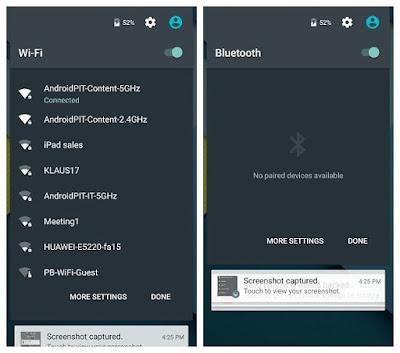
Android - WiFi change without an Application Pause

Image
    Android, since the early versions, has offered users the flexibility to change WiFi via Settings application. The settings application has been a part of the system image and is just like any other application. It needs to be started, resumed for the user to try changing the WiFi settings like connecting to a different network etc.     This meant that developer applications using WiFi functionality had to be paused before the user could change the WiFi settings. Few applications tend to have custom logic and assume that the network can't change before the activity is paused. However, a recent version of Lollipop had a feature where in users could change the WiFi and Bluetooth settings from the expanded status bar window. The UI corresponding to this functionality is hosted as a part of a separate non-application window and it doesn't behave like an application. Expanding the status bar doesn't pause the foreground application. This basically leads to a possibi...

Android - Click Listener for Custom Views

      Custom views in android come in all sizes, shapes and forms. Besides, complex views would like to notify of a click only when a part of the view is clicked. This could specially be a challenge for custom views based on View. This could be achieved via Android's Region API. The logic is to create a region corresponding to the desired section of the view and check if the touch coordinates notified via onTouch(...) falls in the specific region.   final Region region = new Region( left, top, right, bottom );   public boolean onTouchEvent(MotionEvent event) {         float x = event.getX();         float y = event.getY();         switch (event.getAction()) {             case MotionEvent.ACTION_UP: {                 if (region.contains((int) x, (int) y)) {                   ...

Android - Drawable to Bitmap

     Android developers often come across non-bitmap drawable like NinePatchDrawable, ColorDrawable etc and would need a bitmap representation of the same. Typically, custom views based on android's View end up with such needs. Fortunately, it is trivial with android's Canvas API. In fact, the UI Toolkits like Button, ImageView etc eventually use the very same Canvas in its onDraw callback.         if (drawable instanceof BitmapDrawable) {             return ((BitmapDrawable) drawable).getBitmap();         }         final int width = drawable.getIntrinsicWidth();         final int height = drawable.getIntrinsicHeight();         final Bitmap bitmap = Bitmap.createBitmap(width, height, Bitmap.Config.ARGB_8888);         final Canvas canvas = new Canvas(bitmap);         drawable.setBounds(0, 0, c...

Android - VolumeProvider and mute callback

Image
    Android's VolumeProvider has callbacks for volume changes. onSetVolumeTo is invoked when volume is set to a particular value and onAdjustVolume is invoked when the volume is just increased or decreased. However, there isn't any callback whatsoever when the volume is muted. Why would this be ignored? In fact, the VolumeProvider when used with MediaSession enables remote stream in framework's volume panel. It uses different drawable resources for enabled and mute state. RemoteStream(STREAM_REMOTE_MUSIC R.string.volume_icon_description_media, //FIXME should have its own description R.drawable.ic_media_route_on_holo_dark, R.drawable.ic_media_route_disabled_holo_dark, false);// will be dynamically updated Mute state is represented by the disabled cast icon.        Yet, this resource isn't used even when the volume is reduced all the way to zero and the icon isn't even clickable. Why would the platform have a partial support and n...

Android - VolumeProviderCompat and setCurrentVolume

    Android support library developers used a wrapper and delegate pattern to support MediaSession and VolumeProvider for pre-lollipop versions. A volume provider is a callback registered on an active media session to be notified of volume events.  VolumeProviderCompat like any other compat APIs is supposed to enable support in older platform versions. Its API set includes all VolumeProvider's APIs and ideally should facilitate quick development. However, few APIs like setCurrentVolume and getCurrentVolume (when used in Lollipop) doesn't seem to work at all.     Turns out that mCurrentVolume in VolumeProviderCompat isn't even updated. So getCurrentVolume() is never going to return the expected values.     public final void setCurrentVolume(int currentVolume) {         if (mCallback != null) {             mCallback.onVolumeChanged(this);         }     } ...

Android Play Store - Test expansion file downloads

Image
   Google Play store supports application of any size with an additional developer work for applications larger than 50 MB in size. This is done via expansion file support documented here . This post is not a tutorial as to how expansion file support can be enabled in an application, instead is just about verifying if the expansion file download works as expected upon installation from the play store.    Games typically are of huge size with images, video and audio files. One such application is The Walking Dead: Season One from Telltale Games, with an application size of 1.15 GB. So how do we go about testing this? The fact that the Play store can download the expansion file as a part of the apk downloaded makes it difficult to test. The application has everything it needs during the first launch and the code flow to download expansion files explicitly isn't executed. And its not worth the time testing in different devices hoping to hit the scenario.   ...